Keybindings
This covers the controls you need to get around AMF day to day. Feature-specific
keys — Learning Mode, PR Triage, TODOs — are documented on their own pages.
Press ? at any time on the dashboard, or Ctrl+Space then ? in a session,
for the complete, current keybinding reference built into that version of AMF.
It is grouped by area (Getting around, Projects & features, Sessions, Review,
Plan, Settings & other). Press / in it to search: Enter keeps the filter,
and Esc clears it before closing help.
The bottom line of the dashboard always lists the main keys for the selected
row and ends with ? help. On an empty dashboard, project or feature it tells
you the next step (N, n or s).
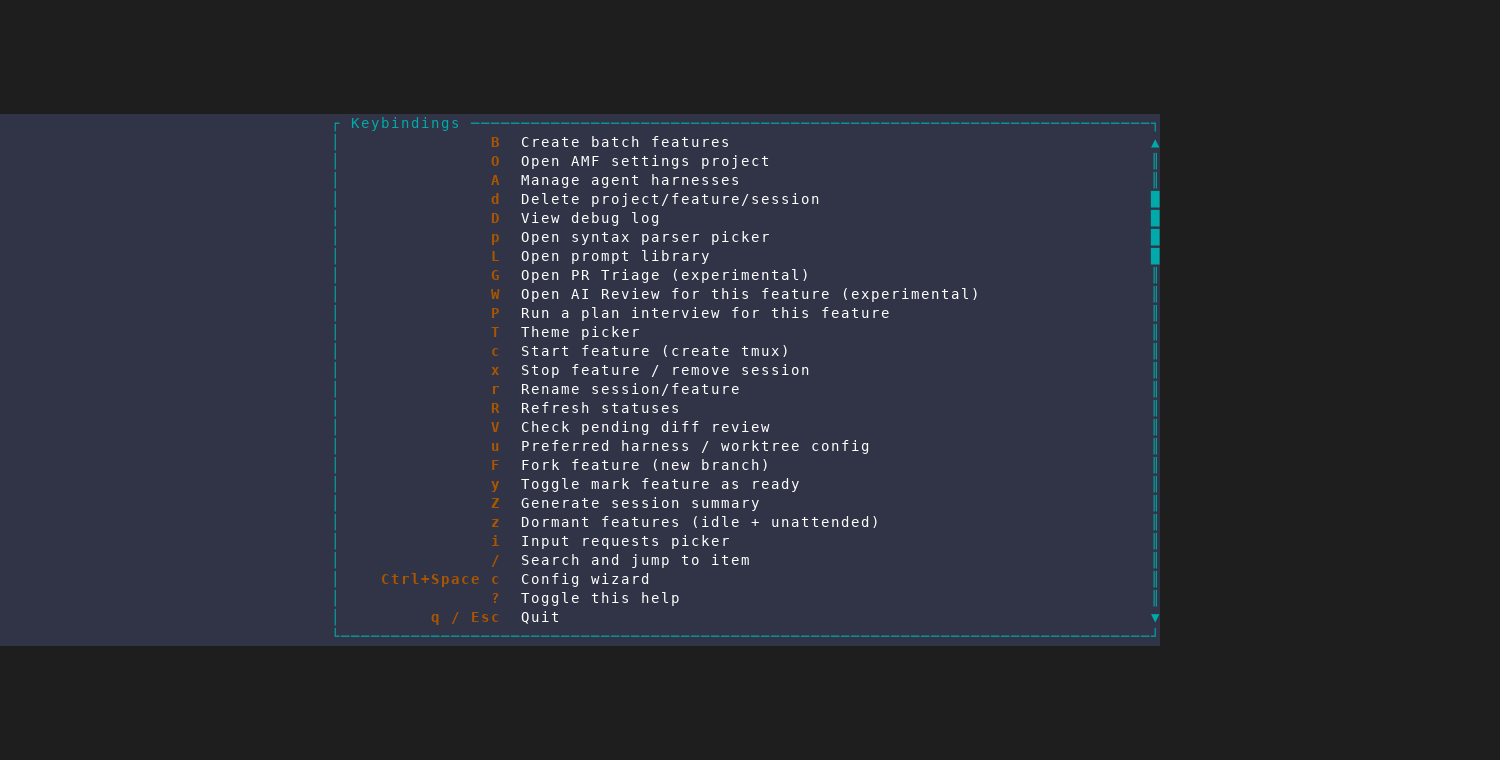
? opens the complete keybinding reference for the running version of AMF.Dashboard
| Key | Action |
|---|---|
j / k or arrow keys | Move through projects, features, and sessions |
h / l | Collapse or expand the selected item |
Enter | Open the selected session or expand/collapse an item |
N / n | Create a project / feature |
B | Create several features at once in the selected project |
s | Add a session to a feature |
c | Start the selected feature |
x | Stop a feature or session (a stopped session stays listed) |
r | Rename a feature or session |
d | Delete a project, feature, or session |
/ | Search and jump |
i | Show agents needing attention: questions first, then finished work |
I | On a TODOs session row: start an agent on the next TODO in priority order, across the lists currently showing |
z | Show dormant features: idle and unattended |
Z | Generate a short AI summary of the selected feature's recent activity |
G | Open GitHub PR triage |
W | Run AMF's AI review of a PR diff |
K | Open Learning Mode: read the code and ask about it |
L | Open the prompt library |
E | Edit headless AI prompt templates (overrides) |
T | Choose a theme |
A | Manage installed agent harnesses |
? | Show all keybindings |
q | Quit |
Esc | Ask "Quit AMF?" (y quits, n/Esc cancels) |
In the New Project and New Feature forms, Tab / Shift+Tab move
between fields. The batch dialog is a step-by-step wizard: Enter advances,
Esc goes back, and Tab / Shift+Tab move between rows only on its final
settings step. In these forms Ctrl+U clears the focused text field, and Space toggles a
checkbox. In New Feature, Enter moves to the next field and creates on the
last one (the session name); Ctrl+S creates from any field. In the harness
manager (A), Enter / Space checks a harness and turns it on or off, c
saves, and Esc closes without saving.
Search (/) accepts every letter, including j and k. Use arrow keys or
Tab / Shift+Tab to select a result, Enter to jump, and Esc to cancel.
Ctrl+Space also opens a leader-command menu from the dashboard, the same
way it does inside a session (below) — that's where bookmarks and a few
other extras live; see
More Session Tools.
Embedded session
Most keys go directly to the active session. In an agent session, typing a
letter opens AMF's compose box, as the header says ("Ctrl+Space: commands ·
type to compose"). Esc closes the compose box and keeps the draft; type a
letter to reopen it. With compose closed, Esc goes to the agent (as ^[),
for example to interrupt it, and does not leave the view: use Ctrl+Q for
that. Ctrl+Space, then e switches between compose and direct input, where
every key goes to the agent.
These controls belong to AMF:
| Key | Action |
|---|---|
Ctrl+Q | Return to the dashboard |
Ctrl+Space | Open the leader-command menu |
Ctrl+Space, then w | Switch sessions |
Ctrl+Space, then i | Jump to an agent needing attention |
Ctrl+Space, then f | Start final diff review |
Ctrl+Space, then p | Open the prompt library |
Ctrl+Space, then E | Edit headless AI prompt templates (overrides) |
Ctrl+Space, then N | Add a TODO to this worktree's list |
Ctrl+Space, then g | Generate a short AI summary of this feature's recent activity |
Ctrl+Space, then e | Switch between compose and direct input |
Ctrl+Space, then ? | Show all keybindings |
Where the rest live
- Understanding a Codebase — the file-tree, ask, and act-on-answer keys inside Learning Mode.
- Reviewing Changes and PR Feedback — PR Triage's investigate/fix/reply keys.
- Prompts and TODOs — the TODO list's own scope-toggle, move/copy, and work-the-queue keys.
- More Session Tools — bookmark slots, resuming a harness's saved transcripts, the fresh-context handoff keys, and Remote Control's status badge and keys.